Current Stack:
-
you may notice a lot of Ubiquiti Unifi equipment. i am not associated with Ubiquiti, nor do i think they are the only option. i work with a ton of Ubiquiti equipment at my job and am aware of where they excel and where they suck. they are the best option for me personally to self-host my network without constant maintenance, while still being able to play around, and for a decent price without subscriptions.
- WAN uplink: fiber ~100-500mbps parallel
-
as long as its fiber and above 100mbps, i don't really care, i negotiate whatever is cheapest every year with promotions so the speed fluctuates.
looks like im currently at ~1000mbps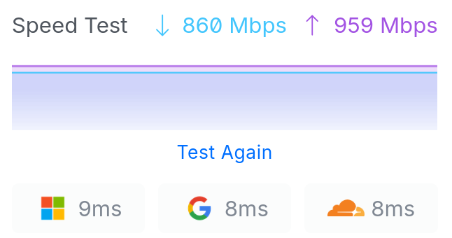
- Firewall/Router: UDM Pro
-
My ISPs ONT just authenticates and gives an RJ45 out like a bridge mode (they also provide an eero router by default to go with it). much nicer than AT&T's or Comcast's set up where you cant get rid of the ont+firewall+router+wifi combo unit (without getting into spoofing the unit)
The UDM Pro is basically an all-in-one Ubiquiti Unifi OS host, which can locally host any unifi application. I use the udm as my router and nvr, so i have:
- Unifi Network
-
- Firewall
- Router
- DNS Server
-
i have a few A Records built out for internal dns to my services.
I do NOT have reverse proxy or certificates running on the udm pro, as far as i am aware, this is not natively supported, though it is sort of possible. the udm pro just runs a custom linux distro and you can access the command line, so you can kind of do whatever you want with it, but all your unsupported changes will probably be wiped whenever you update the unit. - Network Monitoring
- Managed Switch dashboard
- Wireless lan Controller
- WiFi setup and access point management
- VPN
- sort of, i don't have wireguard or openvpn servers running because i am behind carrier-grade nat, so its not possible. but i do use the built-in teleport vpn quite often!
- Unifi Protect
-
- NVR (Network Video Recorder)
- locally stores camera footage, so no subscription like ring has just to view your footage
- Camera management
- control camera and video doorbell settings
- Home Sensor Management
- Connect door sensors and the like and manage settings and alerts
- Access Point (Wi-Fi): Ubiquiti U7 Pro
- Primary and Guest wifi's are on separate isolated VLANs. primary is set up with full wifi 7 feature set, guest is set to wifi 5 2.4ghz for compatibility (i keep home appliances and devices and things that "require" wifi on the guest wifi so (for example) my cat's litter box doesnt have access to everything else on my primary network
- Ubiquiti USW-24-PoE Switch
- simple managed switch with poe
- Security
-
- Ubiquiti G4 Doorbell Pro
- Active
- Ubiquiti Super-link Gateway
- Active
- Ubiquiti Entry sensors
- on all doors and windows. check out a cool project i made for this here!

- Hardware & OS
-
Up until very recently i was running my stack entirely on a raspberry pi 5 w/ 8gb of ram. then i decided to make the push to drop as many large evil tech companies as possible, and needed something more reliable (many of the services i was running werent designed for arm64, and i had to kind of slap things together to make them work)
i had a 2021 Samsung Galaxy Book with an Intel Core i5-1135G7 and 8gb of ram, with a broken screen sitting around collecting dust. so i disconnected the screen and battery from the motherboard and ran it off the hdmi output and usb-c. i'm now working on moving the laptop's internals into a 1u chassis
this is a thin and light laptop, so it is designed to be power efficient. my pi5 only sipped about 5w with the full stack, so power was definitely a factor when deciding to move. luckily this laptop only increased my draw by another 5w or so
moving to x86 has the added benefit of adding the ability to use hardware acceleration for both immich and plex transcoding
i am running debian 13 x64 with kde for a desktop environment (my favorite desktop)
- Services
-
- Docker Containers
-
- nginx-proxy-manager
- reverse proxy + certs for https
- uptime-kuma
- simple uptime dashboard to monitor my services
- dockge
- honestly i prefer just doing my docker management in the command line, but this is a good option if you don't want to go all in on portainer and want a gui
- watchtower
- this runs auto-updates on docker containers, i have it looking for a tag in the docker file configs to only update some of the containers. i only have this on some of the less important ones, since watch tower is deprecated. i may look for a replacement soon
- plex
- self hosted movies and tv shows. i bought a lifetime plex pass for like 80 bucks years ago on a sale so the recent price hike to $750 doesnt deter me too much. if you are starting out, go with jellyfin or another alternative that doesnt hate their clients
- immich
- self hosted synced gallery app (google photos/apple photos but not evil)
version 3 update finally convinced me to get rid of google photos and use nothing but immich - immich-pet-tagger
- simple little project i found on github, create "people" tags for animals and pets. i find it works better than google photos did for this, but your mileage may vary
- notesnook
- self-hosted notes app
this is actually the first thing i started self-hosting. i got really tired of how unusably shit google keep is and went looking for a good alternative. i love the editor in notesnook.
not as straight forward as immich or some of the other containers to set up, but i like the product a lot, and i use it constantly - cloudflare tunnel
- this is a 1-way, outbound only link from my server to cloudflare, who my domain (and this website!) is hosted with. because my internet is begind CGNAT, it it not possible to directly expose my server to the internet, so i cant access these services outside of my home private network. i originally set up cloudflare tunnel up to make my notesnook server(s) accessible from anywhere, so i can sign in in a browser and from my phone app when away from home. this has the added benefit of being much more secure that exposing my server directly
i do not pay for any cloudflare features or products outside of my domain registration for like $10 / year. cloudflare tunnel has a great free teir with very efw limits. the biggest limits with this is that you can not upload / push files to the server through cloudflare tunnel larger than 100mb. for notes, that is fine. but immich can not upload large images or videos with that limit.
for immich, i set up the immich connection with zero-trust, so it is not accessible to the wider internet, then i set up cloudflare one, which is a vpn for client devices to connect directly to your cloudflare network. this means there is no longer a 100mb limit. i set this up on my phone as always on, and have it split-tunneling only immich traffic over the tunnel. immich is now accessible on my phone from anywhere
i do not expose any other services currently - backrest
- runs backups for my important data. this is a gui for restic. i find it to be a great addition
probably the most important part of all of this. self hosting cant be sustainable if you lose photos or data because of a power-outage.
- Samba
- simple smb shares for plex data files for easy upload, and a spare smb share for when i need to move files around devices
- Backup
-
- local backup
- i found an office pc with a 5.25" drive bay and installed a cheap 6 drive bay into it. filled it with some ssd's and installed truenas on the internal nvme drive. this nas sits under my network rack.
- Cloud Backup
- i use backblaze with a b2 bucket. they have incredible pricing, performance, and speed. good alternative to using amazon's s3, as their b2 is fully s3 compatible (this is how i upload backups)
- backrest
- runs as a docker container on my server. backs up immich and notesnook to the local and cloud backup every night, prunes and verifies once a month. everything backrest does is set to send me email notifications over smtp
-
im currently using a ThinkPad X1 Carbon Gen 8 with an Intel Core i5-10210U and 8gb of ram
in April 2026 i switched from win11 to PopOS, that lasted about 3 days before i was having too many issues and stating to dislike cosmic's quirks, so i switched to Fedora KDE 44. i had never used a RHEL derivative before (most of my experience is in debian and ubuntu), but after learning some of the differences, fedora stuck! and KDE is easily my favorite desktop environment now!